
During the long weekend of January 2026, I finished modernising SentimentAnalyzer, my humble .NET library I created 7 years ago which was consumed in multiple .NET apps and middleware packages for Bot Framework. This month, after couple of years, I thought to revamp it.
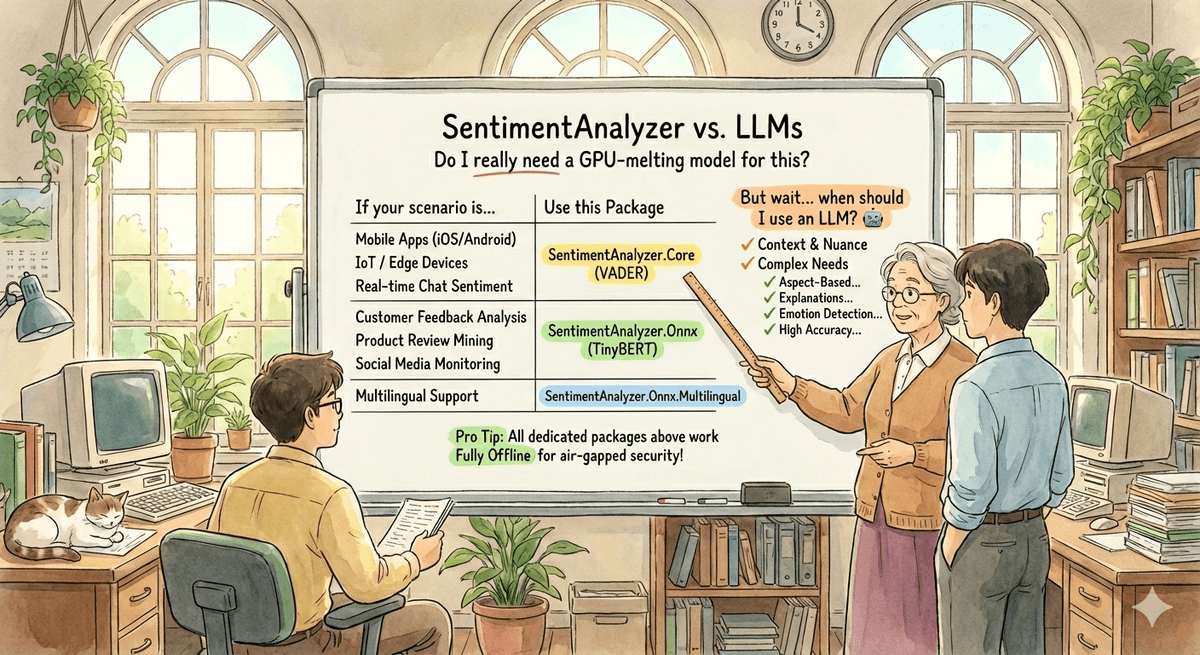
Now, I know, you might be wondering, why bother with a specialised ML library when modern models like GPT-5.2, Claude Opus 4.5 and the likes exist? That's exactly the question I want to answer.
Then and Now
Back in 2021, SentimentAnalyzer was a straightforward .NET library built using ML.NET 1.x and.NET Standard 2.0 targeting with a very basic binary classification of positive or negative reviews. It had a ~15 MB package which used to work absolutely fine (and it still does in case you want to try it out).
Fast forward to 2026 and here's what it looks like now:
| Package | Size | Engine | Languages | Use Case |
|---|---|---|---|---|
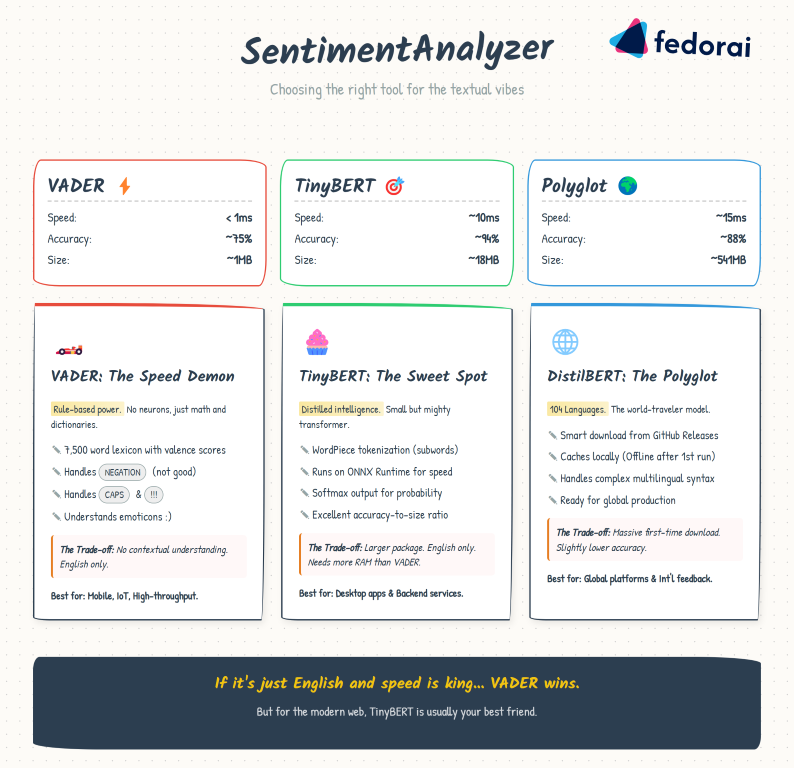
| SentimentAnalyzer.Core | ~1MB | VADER (rule-based) | English | Mobile, IoT, edge |
| SentimentAnalyzer.Onnx | ~18MB | TinyBERT (transformer) | English | High accuracy apps |
| SentimentAnalyzer.Onnx.Multilingual | ~541MB | DistilBERT | 104 languages | Global applications |
Multi-targeting .NET Standard 2.0, .NET 8, and .NET 10. Modern fluent API with a builder pattern. Three-class sentiment (positive, negative, neutral). Batch processing. And the top goal (as I always wanted it to be), completely offline. But before I dive into the technical details, let's address the elephant in the room.
Why On-Device Sentiment Analysis Still Matters
You might ask, why not just use ChatGPT or Gemini? It works, it's flexible, it understands context. Here's why specialized, on-device solutions still have a crucial role.
On-device sentiment analysis isn't just a technical choice, it's often a business and regulatory imperative. Below is why specialised libraries still matter.
Privacy and Compliance
In healthcare (HIPAA), financial services, government and enterprise environments, processing customer feedback locally isn't optional but mandatory. When your application handles sensitive data, the ability to analyse sentiment without any data leaving the device is often the difference between viable and impossible. Air-gapped networks and secure environments simply can't make external API calls.
Economics at Scale
The marginal cost of on-device processing is zero. Whether you're processing 100 reviews or 100 million, there's no per-request charge, no surprise bills, no rate limits. IoT deployments scale to millions of devices without infrastructure anxiety. Mobile apps offer unlimited sentiment features without metered billing. Enterprises get predictable costs regardless of usage spikes.
Latency and Reliability
Sub-millisecond response times unlock experiences that cloud APIs can't match: real-time chat moderation, IoT devices reacting instantly to emotional tone, mobile apps that feel instant even offline. On-device processing means zero external dependencies, your app works in remote areas, during cloud outages and without rate limiting during traffic spikes.
Choosing Your Engine
Getting Started
Ready to try it? Here's the quickest path:
dotnet add package SentimentAnalyzer.Core
using SentimentAnalyzer;

var analyzer = new SentimentAnalyzer();
var result = analyzer.Analyze("I absolutely love this library!");

Console.WriteLine($"Sentiment: {result.Label}");      // Positive
Console.WriteLine($"Score: {result.Score:F2}");       // 0.87
Console.WriteLine($"Confidence: {result.Confidence:P0}"); // 74%
For higher accuracy:
dotnet add package SentimentAnalyzer.Core
dotnet add package SentimentAnalyzer.Onnx
using SentimentAnalyzer;
using SentimentAnalyzer.Onnx;

var analyzer = SentimentAnalyzer.CreateBuilder()
    .UseTinyBert()
    .Build();
Check out the GitHub repo for full documentation, samples for Console, Blazor, MAUI, and benchmarks.
The Architecture and Pluggable Engines
The modernised library uses a builder pattern with pluggable engines:
public interface ISentimentEngine : IDisposable
{
    string Name { get; }
    SentimentResult Analyze(string text);
    IReadOnlyList<SentimentResult> AnalyzeBatch(IEnumerable<string> texts);
}
This means you can:
// Start with VADER for development (fast, no downloads)
var devAnalyzer = SentimentAnalyzer.CreateBuilder()
    .UseVader()
    .Build();

// Switch to TinyBERT for production (higher accuracy)
var prodAnalyzer = SentimentAnalyzer.CreateBuilder()
    .UseTinyBert()
    .Build();

// Or bring your own engine!
public class MyCustomEngine : ISentimentEngine { /* ... */ }
The builder also supports configuration:
var analyzer = SentimentAnalyzer.CreateBuilder()
    .UseTinyBert()
    .WithOptions(new SentimentAnalyzerOptions
    {
        EnableNeutral = true,
        NeutralLowerThreshold = 0.4,
        NeutralUpperThreshold = 0.6
    })
    .Build();
Lessons learned
When I first integrated the DistilBERT multilingual model from HuggingFace, I ran into a bizarre bug: the model always returned the same prediction regardless of input.
"I love this!" → Positive (98%)
"I hate this!" → Positive (98%)
"This is neutral" → Positive (98%)
After hours of debugging, I discovered the ONNX model on HuggingFace was incorrectly exported. The fix? Re-exporting with the optimum library:
from optimum.onnxruntime import ORTModelForSequenceClassification

model = ORTModelForSequenceClassification.from_pretrained(
    "lxyuan/distilbert-base-multilingual-cased-sentiments-student",
    export=True  # This is the key!
)
model.save_pretrained("./corrected-model")
Always validate your ML models with known test cases. Never assume a pre-trained model works correctly just because it's popular.
When to use what
For your decision framework, I've made it easier. You know your challenges better but this is what I think should work for you:
| Scenario | Recommended Package |
|---|---|
| Mobile app (iOS/Android via MAUI) | SentimentAnalyzer.Core (VADER) |
| IoT / Edge device | SentimentAnalyzer.Core (VADER) |
| Real-time chat sentiment | SentimentAnalyzer.Core (VADER) |
| Customer feedback analysis | SentimentAnalyzer.Onnx (TinyBERT) |
| Product review mining | SentimentAnalyzer.Onnx (TinyBERT) |
| Social media monitoring | SentimentAnalyzer.Onnx (TinyBERT) |
| Multilingual support | SentimentAnalyzer.Onnx.Multilingual |
| Air-gapped enterprise | Any (all work offline) |
And when should you use an LLM instead?
- When you need aspect-based sentiment ("The food was great but the service was slow")
- When you need emotion detection beyond positive/negative/neutral
- When you need explanation of the sentiment ("Why is this negative?")
- When accuracy at the 90%+ level is critical and cost isn't a factor
- When you're already making LLM calls and can batch sentiment analysis
LLMs are incredible. I use them daily. But they're not the answer to every problem. For sentiment analysis, a well-defined, bounded task—a specialised library offers zero marginal cost at any scale, sub-millisecond latency on-device, complete privacy with no data leaving the device.
The next time you're tempted to POST customer feedback to an LLM API, ask yourself: Do I really need a trillion-parameter model to tell me if "I love this!" is positive? Sometimes the old ways—updated for modern platforms—are exactly what you need.
Until next time.