
Lately, I kept asking myself one small question while working in the long AI sessions, did this response come from the cache, or did the model process everything again? It is the sort of question anyone paying attention to AI cost and performance eventually asks. It is also not quite the right question, which is what made it interesting.
Now, I know what you might be thinking. Surely the platform already tells us this? Sometimes it does. The problem is that a raw token field is not the same thing as a useful explanation. You still have to work out what happened and whether it should change what you do next.
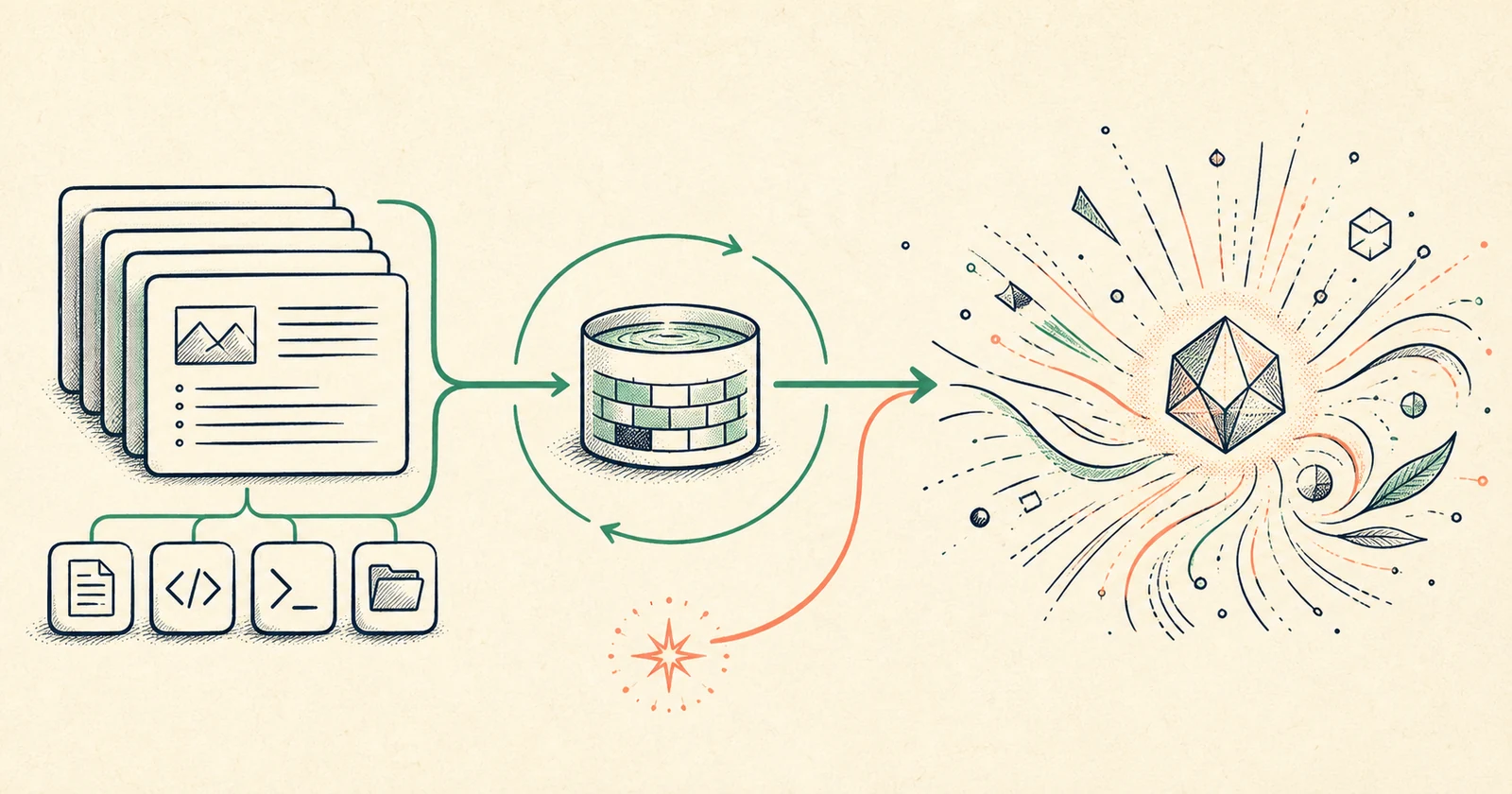
The answer did not come from a cache of old answers. The model generated a new answer. What may have been reused was part of the input which is the stable prefix made up of system instructions, tool definitions, project context, files and earlier conversation history that the model had already processed.
This gives us three different numbers:
- Cached input is the reusable prompt prefix the model did not need to process from scratch.
- Fresh input is the part of the prompt that was not served from cache and had to be processed for this call.
- Output is the newly generated response.
This differentiation is important. The phrase cache hit can sound as though the answer was retrieved from somewhere. In reality, it was not. Prompt caching reuses matching input prefixes. However, the output is still new.
Once I understood that, I couldn't stop noticing how invisible the whole thing was. I could see the answer. I couldn't see how much context was reused to produce it, how much was new or whether waiting too long would make the next call expensive.
As I work closely with both OpenAI Codex (now ChatGPT) and GitHub Copilot, that led me to build two versions of Cache Stats which is an on-demand experience for ChatGPT on Windows and a live canvas extension for the GitHub Copilot app. They share one idea, but they solve two different moments in your workflow.
The invisible economics of a long AI session
Large contexts are sent repeatedly. A coding agent may resend its instructions, repository guidance, tool schemas, file contents and conversation history across several model calls. A single turn may also involve sub-agents, compaction and follow-up calls that never appear as separate requests in the conversation. Without caching, the model processes that repeated prefix again. With caching, much of it can be reused at a lower cost and often with lower latency. That matters in agentic work because the context keeps growing while the useful new information in each turn may be relatively small.
The trouble is that the optimisation happens below the conversation surface. You see the response. You do not see whether the cache was warm, whether it expired while you were away or whether changing models forced the context to be rebuilt. The telemetry may exist, but raw telemetry is not yet a useful product. A field such as cached_tokens, cache_read_tokens or cache_write_tokens still leaves you to work out what happened and whether it changes what you should do next. That became the first principle behind Cache Stats.
Observability should answer the question a person is trying to decide not merely expose the field a platform happens to record.
For ChatGPT, the question is retrospective: Did my previous response benefit from prompt-cache reuse? For GitHub Copilot, the question can be immediate: Is my cache still alive, what will it cost to lose it and should I continue this session now?
Local and read-only by design
There was another principle I didn't want to compromise. Usage observability should not require sending private session data to another analytics service.
Both implementations run locally and read existing usage records without modifying them. Neither sends conversation content to a Cache Stats backend. Neither calls a model to calculate the dashboard. The goal is simple, make the host application's own cache and token signals understandable at the point where they are useful.
Local-first is not just a metric for privacy for me. It keeps the feedback loop fast, makes the source of each number inspectable and avoids the wonderfully circular outcome of spending more model tokens to ask how many model tokens were just used.
Read-only is equally important. An observability tool should not alter the system it is observing. When Cache Stats can't identify the current task or find a completed turn, it refuses to guess. A confident but misattributed token count would be worse than no number at all.
Cache Stats for ChatGPT
The ChatGPT Plugin is deliberately small. You invoke Cache Stats and it reports the immediately preceding completed response in the current task. No dashboard to configure. No separate analytics account to create.
The card separates cached input, fresh input and newly generated output. It also includes the model, reasoning effort and number of model calls behind the turn. This last indicator is useful because one visible assistant response can require more than one call, especially during longer agentic work.
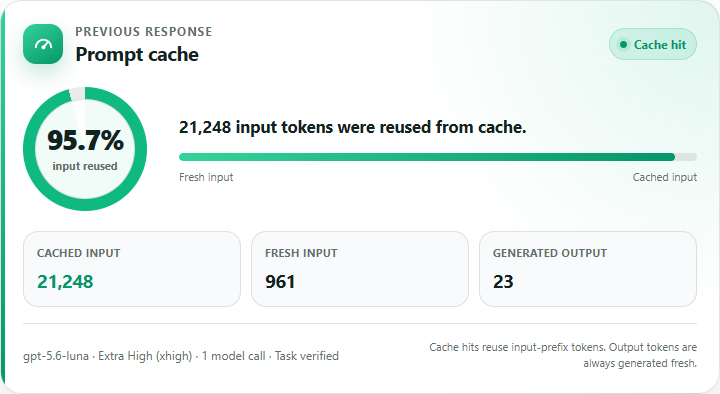
The real ChatGPT card rendered with the plugin's deterministic regression fixture. The data is illustrative, not taken from a personal conversation.
It says newly generated output, not cached output. It describes cached tokens as reused input-prefix tokens. If there is no prior completed response, Cache Stats says so instead of borrowing numbers from another task or reporting an in-progress turn.
Underneath the card is a small local MCP runtime. After explicit installation approval, the skill copies that reviewed runtime into the user's local application-data folder and registers it with ChatGPT. It doesn't need administrator access and it doesn't need any remote service.
Upon invoke, the runtime verifies the current task identity, reads bounded sections of the local session record and finds the latest completed turn with actual usage. It does not scan for a convenient-looking number and it does not reconstruct usage from the prose in the conversation.
The ChatGPT experience isn't trying to be a billing warehouse or a permanent monitoring dashboard. It gives you a trustworthy answer to one question, in the conversation where the question arose.
How to use Cache Stats in ChatGPT
The current release works with ChatGPT for Windows. Once you have added the Cache Stats plugin, select it from the ChatGPT composer and start with:
Set up Cache Stats on this Windows computer.
Before it changes anything, Cache Stats explains that it will copy its reviewed runtime into your local application-data folder and register one local cache-stats-local MCP server. It then waits for your explicit approval. The setup uses Windows PowerShell without administrator access or a network download. When it completes, restart ChatGPT for Windows and open a new task.
Now work as you normally would. Immediately after ChatGPT completes a response, invoke Cache Stats again and ask:
Show the cache usage for my previous response.
You can also ask, Was my previous response cached? Cache Stats will clarify that caching applies to reused input-prefix tokens, not the answer itself, and then show the verified cached input, fresh input and newly generated output for the immediately preceding completed response. If it cannot verify the active task or find a completed response, it refuses to guess.
Why GitHub Copilot needed a different surface
The GitHub Copilot app gives us more detail to work with. In a long coding session, knowing that the last turn reused its prefix is useful. Knowing that the reusable prefix is about to expire is actionable. If a session has accumulated a large context, waiting too long before the next turn can mean paying to write that prefix into the cache again. Changing models can create the same kind of cold start because one model cannot reuse another model's cache.
GitHub's own guidance on optimising AI usage treats preserving the cache as a practical part of working efficiently with agentic coding. The interesting product question is not only what happened? It is what can I still prevent?
That is why this implementation became a live canvas extension. Canvases in the GitHub Copilot app provide a persistent work surface beside the conversation, which is a much better home for a continuously changing operational signal than another chat response.
You can open the Cache Stats canvas and leave it beside the active session. It refreshes locally every two seconds and doesn't use model tokens to render or update the statistics. Therefore, our Cache Stats extension interface has three views:
Live Cache
The first view leads with a countdown to cache expiry and the consequence of missing it. It shows how much of the prompt was actually reused, the AIU cost avoided on the current turn and the estimated cost of rebuilding the same reusable prefix if it expires. This is the decision surface. You should not have to interpret five token columns before discovering that there are three minutes left to preserve a large cache.
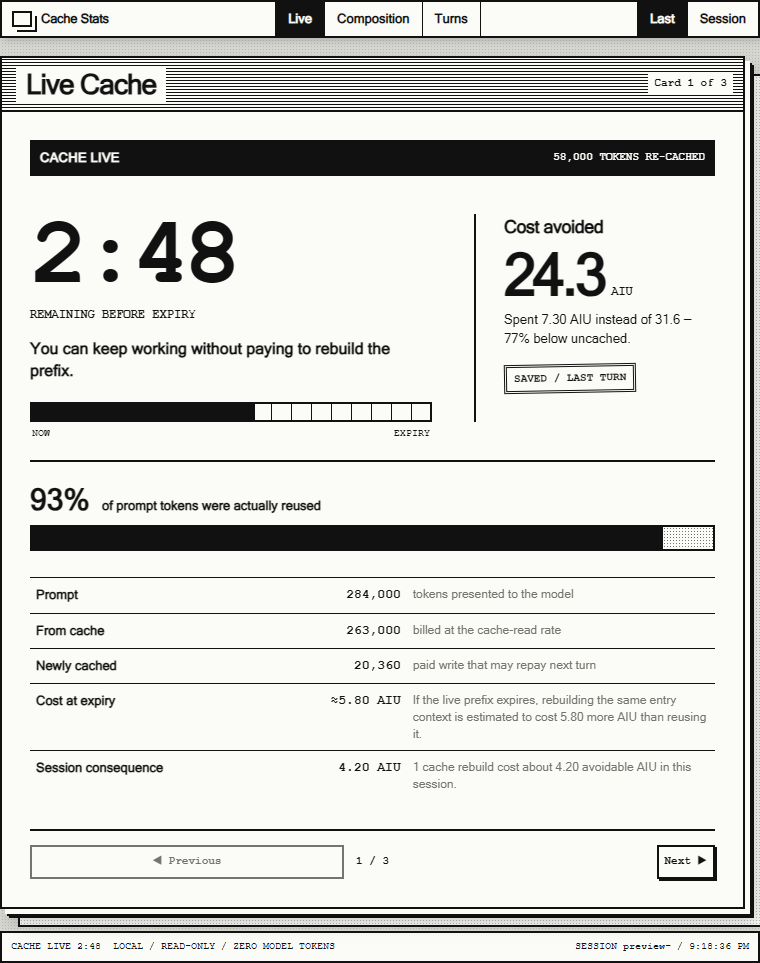
Live Cache leads with the remaining reuse window and the consequence of missing it. Values shown are deterministic illustrative data.
Composition
The second view opens the accounting. It separates fresh input, cache reads, cache writes, output and reasoning tokens. It can show the last turn or the session as a whole, alongside model calls, duration, time to first token and model information.
Cache reads and cache writes deserve separate treatment. A write is an investment in a prefix that may be reused later. A read is where that investment starts to repay. Hiding both under one cached number would make a cold turn and an efficient reused turn look far more similar than they are.
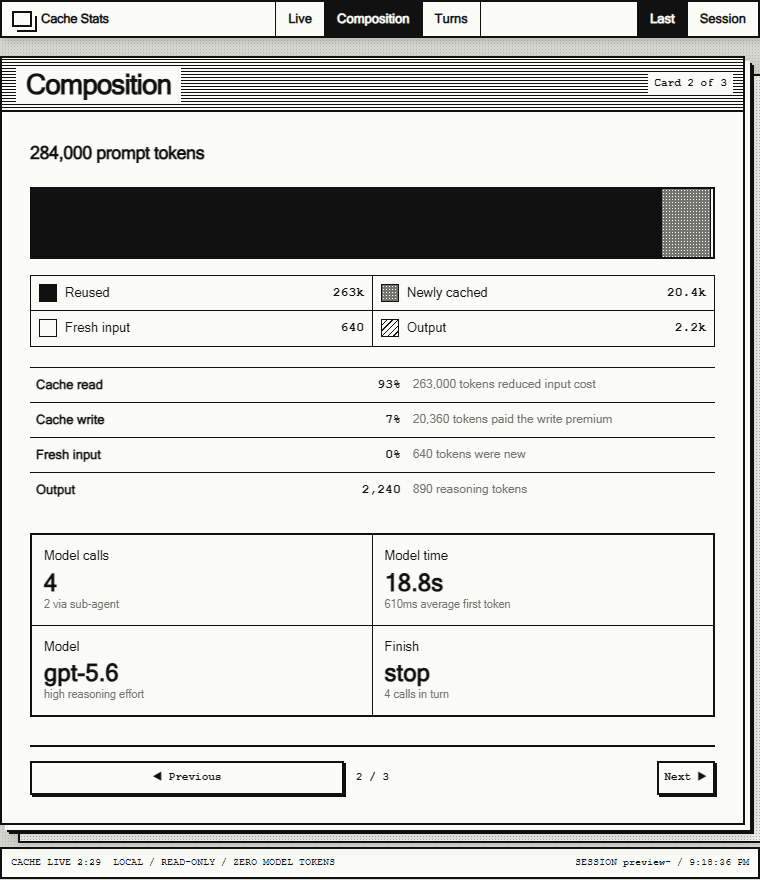
Composition keeps cache reads, cache writes and fresh input visibly separate. Values shown are deterministic illustrative data.
Turn History
The third view makes cache behaviour visible over time. Each turn is marked as SAVED, INVESTED or REBUILT. The timeline includes the idle gap between turns because inactivity is often what explains a cache break.
This is where an abstract optimisation becomes a pattern you can recognise. You can see the expensive cold start, the turns that reused it, the period of inactivity and the point where the context had to be rebuilt.
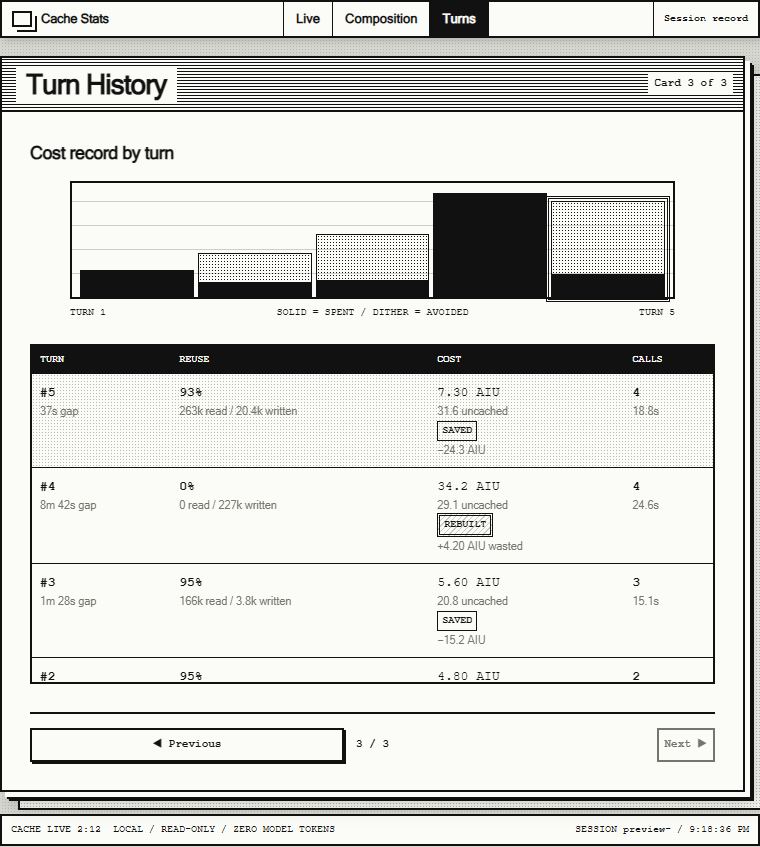
Turn History exposes the cold start, the reused turns and the rebuild after inactivity. Values shown are deterministic illustrative data.
Turning local records into a useful signal
The Copilot extension joins the active session through the GitHub Copilot SDK and listens for the session's usage checkpoint. That checkpoint provides the forward-looking cache-expiry signal used by the countdown.
For the historical detail, the extension opens Copilot's local session store in read-only mode and reads the assistant_usage_events for the current session. It groups the user-initiated call and any agent, sub-agent or compaction follow-ups into one visible turn, because that is the unit you actually experienced.
Cost calculations use the per-token rates recorded for the model call rather than a hard-coded price table. The extension can therefore compare the recorded AIU cost with an uncached baseline and estimate the difference between reading a reusable prefix and having to write it again. AIU is kept as the platform's own usage unit; the extension does not invent a currency conversion that the underlying billing system has not provided.
The canvas itself is served from an ephemeral 127.0.0.1 port. It loads no remote assets, sends no telemetry and does not modify the local session database. The active session ID and database path are available only through that loopback instance for local diagnostics. The result is still telemetry, but it has been shaped around a decision i.e. keep working, or understand the cost of letting this context go cold. That's a much more useful question than simply asking whether the last call was "cached".
If you want to explore the live implementation, the Cache Stats extension for GitHub Copilot is available on GitHub. Install it from a Copilot session, then ask it to open the cache stats canvas:
Install this extension: https://github.com/arafattehsin/cache-stats-extension
Open the cache stats canvas
One idea, two offerings
After building both versions clarified something I think applies well beyond prompt caching. The same metric should not automatically produce the same interface everywhere. In ChatGPT, an inline answer works because you are asking for proof about a completed response. In GitHub Copilot, a live canvas works because the useful moment arrives before the next response, while the cache can still be preserved. Of course the platform surface changes but the philosophy doesn't.
Is Cache Stats going to make every AI system efficient? No. It won't tell you whether the work was worth doing in the first place. But it does make one invisible part of that work visible which is the need Cache Stats is trying to meet. Not another analytics dashboard for its own sake. A small, trustworthy layer between invisible platform behaviour and the human decision it affects.
The answer will still be new. At least now, you can see how much of its context was not.
Until next time.