

Last month, after giving a talk at UTS Sydney, Dr. Nabin Sharma kindly forwarded a batch of session photos with every single one in .HEIC format. I wasn’t impressed when I was asked to pay for an extension just to view an image. So instead of hunting for an online converter, I turned the itch into a problem solving mode and thought to build a local MCP server in .NET that ingests HEIC images (or folders full of them) and spits out PNGs. Fifteen minutes of code later with GitHub Copilot agent mode, I had a drop-in utility I can reuse anywhere.
Yes, there could have been a simple utility instead of MCP Server but I try to learn new things by solving the real-life challenges and this was one of them!
Below is a full walkthrough, beginner-friendly MCP primer and a request/response diagram. Clone the repo link provided below, point it at a folder and enjoy automatic HEIC → PNG (or JPG) conversion with no internet / credit card required.
Why MCP?
Model Context Protocol (MCP) is a lightweight, bidirectional protocol that lets tools stream context to an LLM-aware “model process” over plain old stdin/stdout. Think of it as a JSON-over-pipes handshake:
-
The client writes a JSON request (the “context”) to stdin.
-
The server processes that context by calling local functions, models, or in our case Magick.NET and writes a JSON response back on stdout.
Microsoft has published the most comprehensive course on MCP and it is suited for absolute beginners. I'd highly recommend you to participate in that self-paced learning.This is ideal because I did not have to use any ports or CORS. It is language agnostic (I used C#, you can use other supported languages). It's blazingly fast in case you want to test it.

Prerequisites
Here's the list of items you need to build it.| Tool | Why you need it |
|---|---|
| .NET 9 | Builds & runs the server |
| Visual Studio Code | Prototyping / debugging |
| Magick.NET-Q16-AnyCPU | HEIC/JPG → PNG magic |
| ModelContextProtocol | C# SDK |
Code
Let's start with the basic Console app with aProgram.cs and two classes: HeicConverter.cs and HeicTools.cs. Below are both the details of both the files.
A very quick overview of the code (HeicConverter.cs). Below is the file which covers the main operation of converting the images.
Then just create another file mainly for MCP tools (HeicTools.cs) and just wrap the above code.
Once it is done, then all you have to do is add below code to your Program.cs:
builder.Services
    .AddMcpServer()
    .WithStdioServerTransport()
    .WithToolsFromAssembly();

await builder.Build().RunAsync();
Testing
Once the code builds correctly. You have a few options to test it out.- You can use Claude Desktop or any similar tool.
- You can also use Visual Studio Code with GitHub Copilot agent
mcp.json file as shown below.
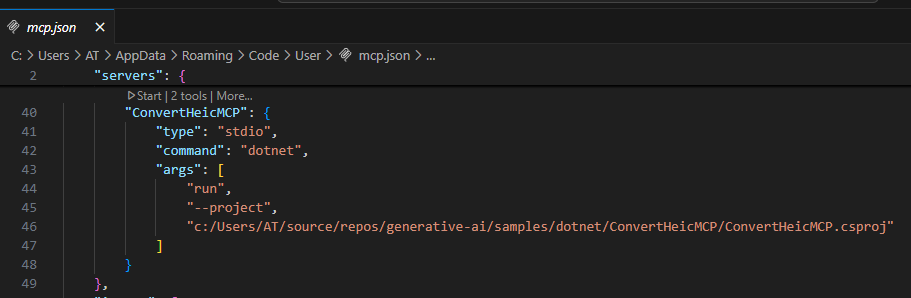 Then navigate to the GitHub Copilot chat window and refresh the tools icon.
 Once you do that, you will see your MCP Server in the list like this:
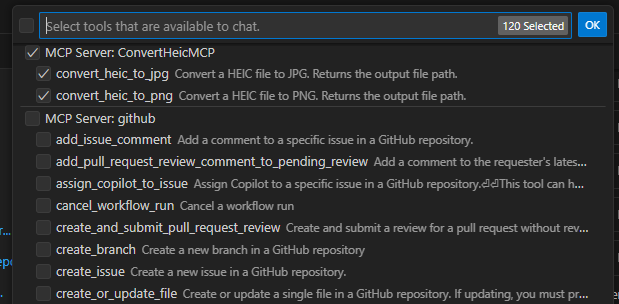 All good for your test now! Just place your
 .heic files into any folder. Either convert all of those or just give an absolute path of a specific file with a target output. I used the prompt as:
I want to convert all the HEIC files to JPG from C:\Users\AT\Desktop\Important\Pictures to be converted and put the output here: C:\Users\AT\Desktop\Important\Pictures to be converted\output
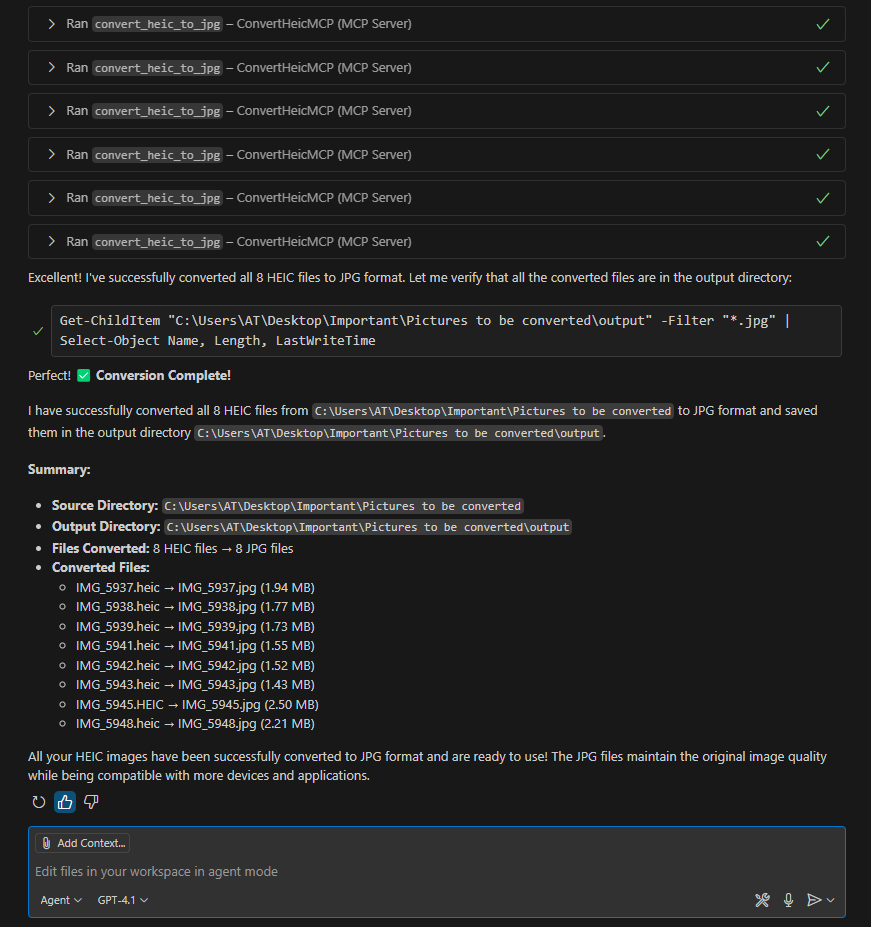 As you can see, it converted all of my images into a PNG image and one of them can also be seen on my speaking engagements section.
We saw that just a few lines of .NET 9 and Magick.NET, MCP enabled me to quickly transform a frustrating HEIC-to-PNG conversion problem into an efficient, reusable local solution. Give this simple MCP server a try yourself. Clone the repo, experiment with your images and start automating away your own everyday tech annoyances. Lastly, if the sample helps you then please do not forget to give repo a star.
Until next time.
As you can see, it converted all of my images into a PNG image and one of them can also be seen on my speaking engagements section.
We saw that just a few lines of .NET 9 and Magick.NET, MCP enabled me to quickly transform a frustrating HEIC-to-PNG conversion problem into an efficient, reusable local solution. Give this simple MCP server a try yourself. Clone the repo, experiment with your images and start automating away your own everyday tech annoyances. Lastly, if the sample helps you then please do not forget to give repo a star.
Until next time.