

In our previous episode, we made the sequential pipeline fast by introducing concurrent pattern. Three reviewers ran at the same time, a real aggregator merged them into a Decision Pack and we shipped concurrency you could see on the UI. OnboardFlow took a slow lane and turned it into a multi-lane intersection.
But concurrency only solves one half of the real-world problem. The other half shows up the moment your three reviewers don't quite agree.
Security says the integration risk is manageable. Compliance says the data residency question is unresolved. Finance says the customer can proceed, but only with prepayment terms. Customer Success says the whole response sounds like a rejection letter written by a committee that has never met a customer. Now what? You don't just need three opinions. You need a conversation.
That's where Group Chat orchestration begins.
From parallel review to a moderated room
Concurrent orchestration is excellent when agents can work independently. Each reviewer reads the same input, produces their own output and the system aggregates the results. Fast, predictable, enterprise-friendly.
Group Chat is different. Group Chat is for problems that improve through interaction. One agent says something. Another challenges it. A third reframes it. A moderator decides who speaks next, when the discussion should continue and when it's finished.
Microsoft Agent Framework describes Group Chat orchestration as a collaborative conversation among agents, coordinated by an orchestrator that determines speaker selection and conversation flow. Internally it uses a star topology; the orchestrator sits in the middle and manages who participates next.
That makes it feel less like a pipeline and more like a meeting. And like every meeting, it needs two things: a clear chairperson, and a reason to end. Without those, you haven't built Group Chat. You've built a calendar invite with token billing.
A star, not a free-for-all
Before we look at any code, here's the mental model:
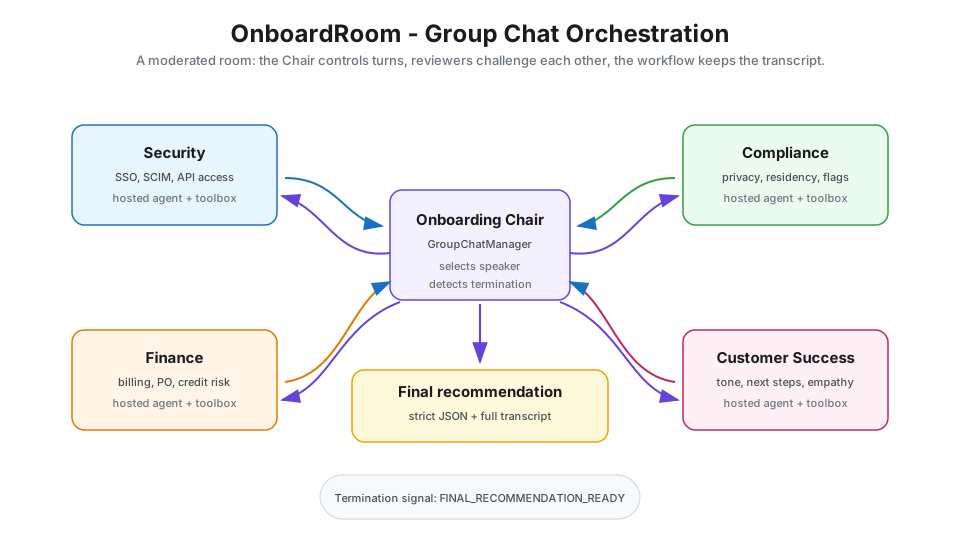
The reviewers do not shout into the void. The manager coordinates flow. That can be a simple round-robin strategy, a prompt-based selector or completely custom logic. We'll build both, a stock RoundRobinGroupChatManager and a custom Chair-led manager that decides for itself when the room has reached agreement.
Group Chat is the collaborative middle of the pipeline. Everything before it prepares the conversation. Everything after it packages the decision.
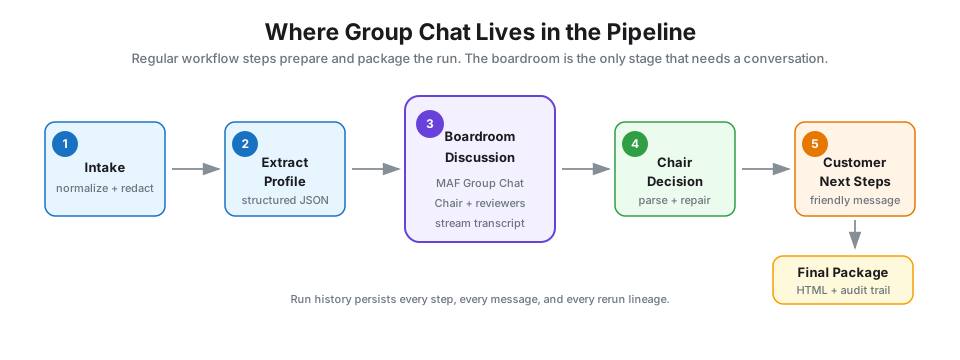
That's a useful design principle on its own: don't make Group Chat do all the work. Make it do the work that actually needs discussion.
Introducing OnboardRoom
We're not replacing OnboardFlow. OnboardFlow stays as the anchor sample for concurrent orchestration. For Group Chat, we introduce a new sample called OnboardRoom.
The story is simple. A high-value B2B SaaS customer wants onboarding approval, but the request has tradeoffs:
"Enterprise customer in EU, wants SSO + SCIM, plans to ingest support tickets, needs Salesforce integration, invoicing via PO, and is asking for early access to an analytics feature that's not generally available yet. They want to go live in three weeks."
In OnboardFlow, the reviewers would have written three independent reports. In OnboardRoom, they sit in a room together and talk about it.
The entire sample is open-sourced on GitHub.
The five voices in the room
| Role | Responsibility | Has tools? |
|---|---|---|
| Security Reviewer | Integration risks, SSO, SCIM, API access, operational controls | Yes |
| Compliance Reviewer | Privacy, data residency, contract flags, missing obligations | Yes |
| Finance Reviewer | Billing setup, invoicing, payment risk, special commercial terms | Yes |
| Customer Success Reviewer | Whether the response feels customer-friendly; turns blockers into onboarding steps | Yes |
| Onboarding Chair | Facilitates, summarises agreement, asks for clarification, decides when the meeting is done | No |
Notice what's deliberate here. The Chair has no tools. Its job is moderation, not analysis. If the Chair starts doing the reviewers' work, the orchestration collapses back into a single agent wearing four hats. We've seen that movie. It ends with hallucinated SOC 2 controls.
Why these reviewers are Foundry Hosted Agents
We've used ChatClientAgent in every sample so far. They live inside your app, you pass model credentials, you wire up tools manually. Perfect for samples. Less perfect for an enterprise where five teams want to evolve five different reviewers without redeploying the orchestrator.
This time, every reviewer is a Foundry Hosted Agent. The agent definition (model, instructions, tool selection, version) lives inside the Foundry project, not inside your app. Your app just asks the project for an agent by name and gets back a real AIAgent it can drop into a workflow.
using Azure.AI.Projects;
using Azure.Identity;
using Microsoft.Agents.AI;

var projectClient = new AIProjectClient(
    new Uri(Environment.GetEnvironmentVariable("FOUNDRY_PROJECT_ENDPOINT")!),
    new DefaultAzureCredential());

// Look up an agent that was versioned and published in the Foundry portal.
var agentRecord = await projectClient
    .AgentAdministrationClient
    .GetAgentAsync("onboardroom-security-reviewer");

FoundryAgent security = projectClient.AsAIAgent(agentRecord);
Three things matter here.
First, FoundryAgent extends DelegatingAIAgent, which means it plugs straight into any MAF workflow that accepts AIAgent. There is no special "hosted agent" code path in the orchestration layer.
Second, the agent definition lives server-side in Foundry. Your process does not own the model configuration or the portal-managed instructions. Tool invocation is explicit i.e. if your app supplies MCP tools to the agent, your app also owns that MCP client boundary. That's a cleaner governance split when Security and Compliance are literal teams in your company.
Third, agents are versioned. The Compliance team can publish v3 of their reviewer with sharper instructions and your orchestrator picks it up on the next call. No redeploy. No PR.
Shared expertise via Foundry Toolbox over MCP
Hosted agents solve "where does the agent definition live". They don't solve "how do five agents share the same set of tools without duplicating credentials, OAuth tokens and connection strings five times".
That's what Foundry Toolbox is for. The current Agent Framework support standardise Toolbox access through MCP. Your app connects to the Toolbox MCP endpoint, discovers tools with McpClient, and passes those MCP tools into the agents.
Foundry owns the toolbox configuration and exposes it through an MCP proxy. Your app owns the MCP client connection, tool discovery and the decision about which agents receive those tools.
For OnboardRoom, we curate a single Toolbox called onboardroom-toolbox with MCP-accessible tools:
- Web Search — so reviewers can check public documentation and citations
- Code Interpreter — so Finance can do quick TCO calculations without faking arithmetic
- An MCP tool pointing at a public MCP server — so the room can reach into a real API surface (we use gitmcp in the sample so anyone can run it without extra Azure setup)
The current sample shape looks like this:
using ModelContextProtocol.Client;
using Microsoft.Extensions.AI;

using var httpClient = new HttpClient(
    new BearerTokenHandler(credential, "https://ai.azure.com/.default")
    {
        InnerHandler = new HttpClientHandler(),
    });

string toolboxEndpoint =
    $"{projectEndpoint.ToString().TrimEnd('/')}" +
    "/toolboxes/onboardroom-toolbox/mcp?api-version=v1";

await using McpClient toolboxClient = await McpClient.CreateAsync(
    new HttpClientTransport(
        new HttpClientTransportOptions
        {
            Endpoint = new Uri(toolboxEndpoint),
            Name = "onboardroom-toolbox",
            TransportMode = HttpTransportMode.StreamableHttp,
            AdditionalHeaders = new Dictionary<string, string>
            {
                ["Foundry-Features"] = "Toolboxes=V1Preview",
            },
        },
        httpClient));

IList<McpClientTool> mcpTools = await toolboxClient.ListToolsAsync();
IList<AITool> reviewerTools = [.. mcpTools.Cast<AITool>()];

FoundryAgent security = projectClient.AsAIAgent(securityRecord, reviewerTools);
FoundryAgent compliance = projectClient.AsAIAgent(complianceRecord, reviewerTools);
FoundryAgent finance = projectClient.AsAIAgent(financeRecord, reviewerTools);
FoundryAgent cs = projectClient.AsAIAgent(customerSuccessRecord, reviewerTools);

// The Chair gets no tools. It facilitates; it does not analyse.
FoundryAgent chair = projectClient.AsAIAgent(chairRecord);
One toolbox endpoint. Four reviewers discover the same tool surface. The Chair gets none. When the Foundry admin changes the toolbox, the app still points at the same MCP boundary and the reviewers pick up the new capability on the next run.
That distinction matters. OnboardRoom does not use the old mental model where Toolbox tools magically appear through projectClient.GetToolboxToolsAsync(...). In the current Agent Framework, Toolbox is an MCP integration. The app process opens an MCP connection, lists tools and gives those tools to the agents. Foundry still centralises the toolbox definition, versioning and auth boundary; your orchestrator stays explicit about which participants can use the tools.
The Chair: round-robin first, custom manager second
A Group Chat workflow needs two things to exist. Participants which we have and a manager that decides who speaks next and when the chat is done. MAF already gives you a stock implementation for the first ninety percent of use cases:
var participants = new AIAgent[] { chair, security, compliance, finance, cs };

var workflow = AgentWorkflowBuilder
    .CreateGroupChatBuilderWith(agents => new RoundRobinGroupChatManager(agents)
    {
        MaximumIterationCount = 10
    })
    .AddParticipants(participants)
    .WithName("OnboardRoom")
    .Build();

await using var run = await InProcessExecution.OpenStreamingAsync(workflow);
await run.SendMessageAsync(applicantProfileJson);

await foreach (var evt in run.WatchStreamAsync())
{
    if (evt is AgentResponseUpdateEvent update)
    {
        Console.Write($"[{update.Update.AuthorName}] {update.Update.Text}");
    }
}
Three classes carry the entire pattern:
AgentWorkflowBuilder.CreateGroupChatBuilderWith(...)— the factory that hands you a Group Chat builder, parameterised by a manager factory.RoundRobinGroupChatManager— picks the next speaker in order, terminates whenIterationCounthitsMaximumIterationCount.InProcessExecution.OpenStreamingAsync(workflow)— gives you back aStreamingRunwhose events you can pipe straight into SignalR for live UI updates.
This is enough to ship a working OnboardRoom. Reviewers take turns, the Chair lands a recommendation in the final round, you persist the transcript. Done.
But round-robin has one glaring weakness. The room can't end early. Even if all four reviewers agree by round three, you'll burn seven more rounds of LLM calls because the manager doesn't know what "agreement" looks like.
That's why we ship a second manager.
A custom Chair-led manager
GroupChatManager is an abstract class. Two virtual methods do most of the interesting work:
internal sealed class ChairLedGroupChatManager(IReadOnlyList<AIAgent> agents)
    : GroupChatManager
{
    private const string TerminationToken = "FINAL_RECOMMENDATION_READY";

    private readonly AIAgent _chair = agents.First(a => a.Name == "OnboardingChair");
    private readonly IReadOnlyList<AIAgent> _reviewers =
        agents.Where(a => a.Name != "OnboardingChair").ToList();

    protected override ValueTask<AIAgent> SelectNextAgentAsync(
        IReadOnlyList<ChatMessage> history,
        CancellationToken ct = default)
    {
        // First and last word in the room belong to the Chair.
        if (history.Count == 0 || ShouldChairReact(history))
        {
            return ValueTask.FromResult(_chair);
        }

        // Chair can address a specific reviewer with "@Compliance, ..."
        var lastChair = history.LastOrDefault(m => m.AuthorName == _chair.Name);
        var addressed = TryParseAddressed(lastChair, _reviewers);
        if (addressed is not null)
        {
            return ValueTask.FromResult(addressed);
        }

        // Otherwise rotate through reviewers in order.
        var nextIndex = IterationCount % _reviewers.Count;
        return ValueTask.FromResult(_reviewers[nextIndex]);
    }

    protected override ValueTask<bool> ShouldTerminateAsync(
        IReadOnlyList<ChatMessage> history,
        CancellationToken ct = default)
    {
        // Hard cap so a runaway chat never burns the budget.
        if (IterationCount >= MaximumIterationCount)
        {
            return ValueTask.FromResult(true);
        }

        // Soft termination: the Chair declares the meeting over.
        var last = history.LastOrDefault();
        return ValueTask.FromResult(
            last?.AuthorName == _chair.Name &&
            (last.Text ?? string.Empty).Contains(TerminationToken));
    }
}
Three rules. The Chair opens the meeting. The Chair can address a reviewer directly. The Chair closes the meeting by emitting FINAL_RECOMMENDATION_READY. Combined with a hard MaximumIterationCount, you get a room that ends when it's ready or when the budget runs out; whichever comes first.
This is the entire reason GroupChatManager was designed as an abstract class rather than a sealed primitive. The current API also gives custom managers UpdateHistoryAsync(...) for shaping the messages broadcast to participants, plus checkpoint hooks for persisting manager-specific state. The next person who builds this might want a probabilistic speaker selector, an LLM-driven moderator or a manager that escalates to a human when reviewer positions stay too far apart. The framework happily lets you swap in any of those.
Structured output matters
Group Chat in natural language is great for the conversation. It's terrible for downstream systems that need to route, store and diff the result. So the very last thing the Chair does is the message that contains FINAL_RECOMMENDATION_READY which must also be strict JSON.
{
  "recommendation": "approve_with_conditions",
  "confidence": "medium",
  "conditions": [
    "Confirm EU data residency requirements before production activation.",
    "Require SSO and SCIM configuration review before go-live.",
    "Use invoice billing with standard 30-day terms after finance approval."
  ],
  "unresolved_questions": [
    "Does the Salesforce integration require access to customer support ticket content?"
  ],
  "reviewer_positions": [
    {
      "reviewer": "Security",
      "position": "approve_with_controls",
      "summary": "Integration is acceptable if SSO, SCIM and API access controls are reviewed."
    },
    {
      "reviewer": "Compliance",
      "position": "manual_review",
      "summary": "EU data residency must be confirmed in writing before go-live."
    }
  ],
  "customer_message_guidance": [
    "Keep the response positive.",
    "Frame conditions as onboarding steps, not blockers."
  ],
  "internal_notes": [
    "Customer pushed for early-access analytics; politely defer to standard GA timeline."
  ]
}
Same JSON parse + repair loop pattern as OnboardFlow. Parse the Chair's payload, and if it's malformed, send a single repair prompt: "Return valid JSON only matching the schema. No prose." If the second attempt fails, fail the step with a friendly error. Never let a malformed JSON crash the pipeline silently.
Notice what we did not do. We did not ask the Chair to rewrite every reviewer's opinion in its own words. The reviewer_positions array preserves the reasoning trail. That's the difference between a useful orchestrator and a summariser wearing a manager badge.
PII redaction, audit trail and rerun
Same enterprise guardrails as OnboardFlow.
- PII redaction before any LLM call. Emails and phone numbers are replaced with placeholders (
[EMAIL_1],[PHONE_1]). The original is stored inInputTextOriginalfor audit. Hosted agents only ever see redacted text. SignalR previews only ever show redacted text. - Every participant message is persisted.
GroupChatMessagerows store speaker name, role, sequence number and metadata so the UI can replay the entire boardroom transcript at any point in the future. - Immutable run history. Reruns create new
WorkflowRunrows withParentRunIdandRootRunIdpointing back to the lineage. Steps before the rerun point are markedSkipped. You can always trace a recommendation back to the exact transcript that produced it. - No
CheckpointManagerin v1. It's the right tool for long-running, human-in-the-loop flows and it earns its own episode. The SQLite-based rerun model is sufficient for an interactive review board.
Let's talk about Demo!
OnboardRoom ships in two flavours, deliberately. Both live in the same repo at generative-ai/samples/dotnet/maf-groupchat-orchestration.
The console demo is the entire pattern in roughly 200 lines of C#. One Program.cs, a --mode roundrobin|chair-led flag, and a printout of the transcript with speaker badges. If you only have ten minutes and just want to feel the orchestration shape, that's where you start.
The full-stack UI is the same Clean Architecture scaffold as PolicyPack Builder and OnboardFlow — ASP.NET Core, SignalR, EF Core + SQLite, React 18 + Vite + Mantine v7 — extended with a Boardroom view that streams agent messages live and a Chair Recommendation panel that decodes the structured output.
The workflow pipeline
| Step | Name | Type | Purpose |
|---|---|---|---|
| 1 | Intake + Normalize | Non-LLM | Clean whitespace, redact PII, validate input |
| 2 | Extract Applicant Profile | LLM | Structured JSON: company, contact, features, integrations |
| 3 | Boardroom Discussion | Group Chat (MAF) | Five hosted agents converge on a recommendation |
| 4 | Chair Final Recommendation | LLM (structured) | Parse + repair the Chair's final JSON payload |
| 5 | Customer Next Steps | LLM | ≤200 word customer-facing message |
| 6 | Final Package | Non-LLM | HTML export with full audit trail |
Steps 1, 2, 4, 5 and 6 are regular step executors orchestrated by OnboardRoomOrchestrator. Step 3 is the only one that builds a MAF workflow — and inside that workflow lives the entire Group Chat dance. Same hybrid approach as OnboardFlow: standard orchestration for the linear parts, MAF for the part that genuinely needs it.
Architecture
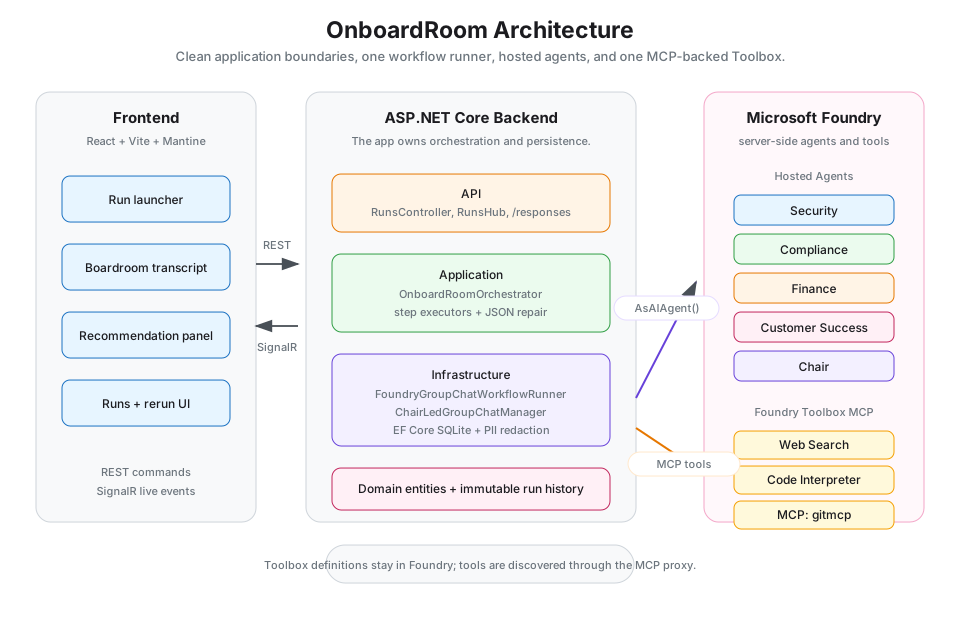
The Application layer owns the pipeline. The Infrastructure layer owns the one class, FoundryGroupChatWorkflowRunner that knows how to build a MAF Group Chat workflow, attach hosted agents, swap managers and stream events. Everything else stays portable.
A boardroom you can see
The UI's biggest "aha" is that the transcript streams in as it happens. You watch the Chair open the meeting, you see Security challenge a Salesforce integration assumption, you watch Customer Success push back on language that sounds too negative, and finally the Chair's recommendation lands in a separate panel — clearly delineated from the raw transcript.
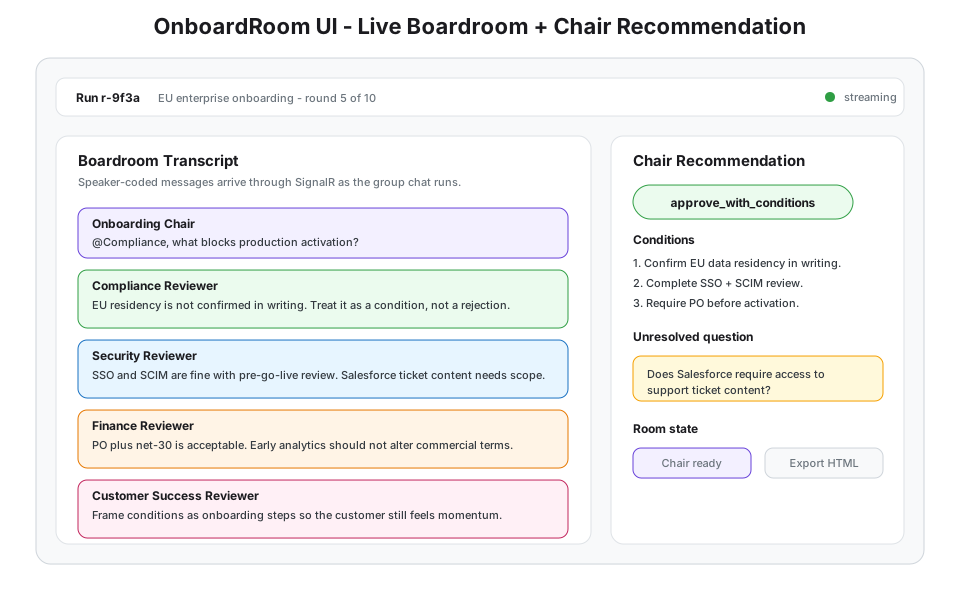
OnboardRoom running the Group Chat orchestration flow end to end.
If the manager hits MaximumIterationCount before the Chair emits FINAL_RECOMMENDATION_READY, the UI shows a warning banner: "Maximum rounds reached without clear agreement." The recommendation panel still renders — it's the Chair's best attempt — but you know the meeting timed out rather than concluded. Those two states should never feel the same.
Expose the boardroom as a Foundry endpoint
This is what a nice symmetry that falls out of using hosted agents. The same workflow you just built can be exposed back to Foundry as a Foundry-compatible /responses endpoint. Any Foundry client — the portal, another agent, an external app speaking the Responses protocol — can call your OnboardRoom workflow as if it were a single hosted agent.
// In OnboardRoom.Api/Program.cs
var workflow = await groupChatRunner.BuildWorkflowAsync();

builder.Services.AddFoundryResponses(workflow);

var app = builder.Build();
app.MapFoundryResponses();   // exposes /responses
Two lines on top of what we already had. The AddFoundryResponses + MapFoundryResponses pair come from Microsoft.Agents.AI.Foundry.Hosting, and the same pattern is shown in the official Hosted-Workflow-Handoff sample.
I won't dwell on it because it's not the headline pattern of this post. But it's worth understanding the layering, you consumed Foundry hosted agents to build the workflow, and now you can publish the workflow itself as if it were one. Composition all the way down.
A decision guide
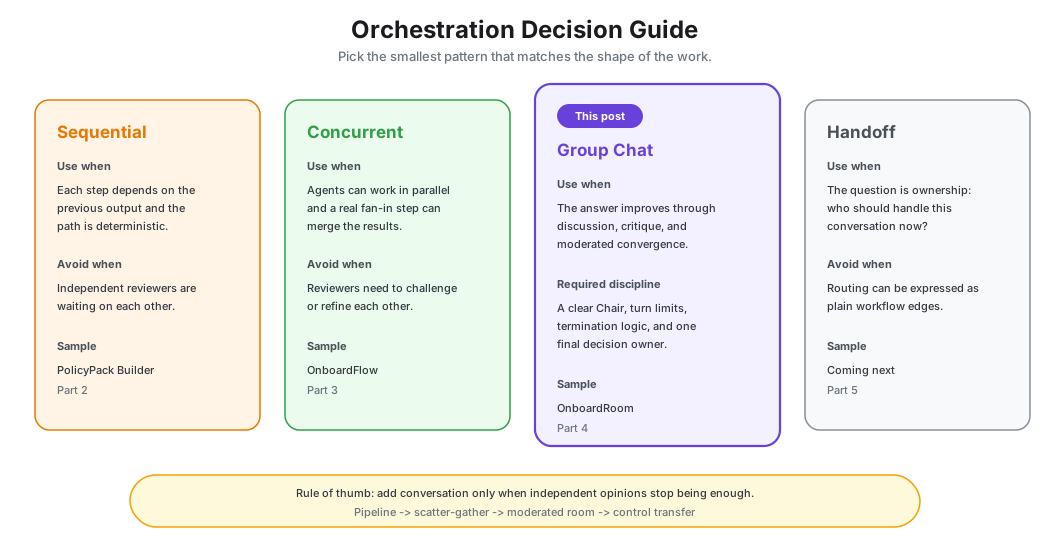
- Group Chat when the solution improves through discussion, critique and iterative refinement.
- Concurrent when agents work independently and you only need aggregation.
- Sequential when each step depends on the previous step and no discussion is needed.
- Avoid Group Chat when you can't define turn limits, termination logic or a clear final decision owner.
Start with RoundRobinGroupChatManager for v1. Move to a custom manager once the business rule for speaker selection is obvious. If you can't articulate that rule yet, you're not ready to be writing one.
Coming up next
We've moved from "one step at a time" to "three reviewers at once" to "five voices in a room until the Chair calls time." Three orchestration shapes, three discipline levels, one common thread where the workflow drives and the agents act.
In our next post, we tackle the pattern where the question isn't sequencing, parallelism or conversation. It's ownership. When the real question is "who should own this right now?", you need Handoff orchestration — conversational control moving between specialists, including escalation to humans.
In our coming post, we'll also ask the two questions that make handoff systems production-ready; how does the system know when to hand off? and how does the system know when the conversation has found its right owner?
Until next time.